writeup · Aug 31, 2026
LabHomelab
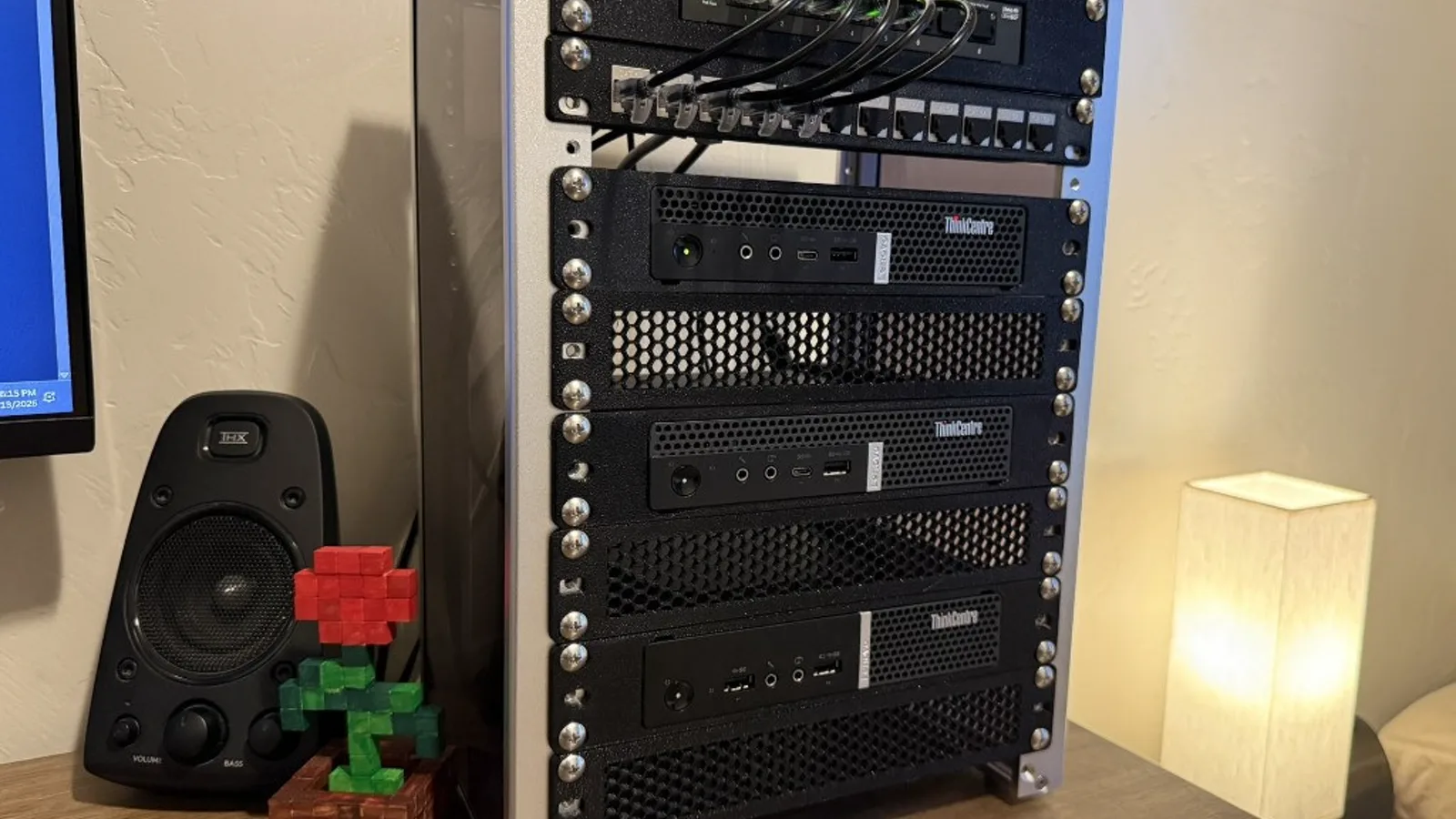
I built a 10 inch desk rack with OPNsense on the edge, two Proxmox nodes, and a VXLAN lab that stays off the house network.
Why I built it
I wanted a place to practice both sides of the work. Administer a small network like a defender, then attack it, without putting the rest of the house on that path. The public notes are in the Homelab repo.
The constraint
The switch in the cabinet is a TP-Link LS108GP. It's unmanaged, so it can't do VLANs. Everything plugged into it shares one Layer 2 network. I call that network Core. Sirius sits at the edge and never sees traffic between two devices on that switch. If isolation lived only there, a guest on the attack network could reach a phone or laptop on Core without crossing a firewall.
So I run two OPNsense installs, and they're easy to mix up. Sirius is the physical edge. gw-01 is a VM on Polaris that routes the lab and nothing else. The deny from the attack network to Core is a rule on gw-01, where every lab packet has to pass.
Sirius has a 10Gtek Intel I350 for WAN and LAN. I confirmed which igb device was which at the console by plugging in one cable at a time, and I labeled the bracket to match.
What is in the rack
The cabinet is a DeskPi RackMate T1, 8U and 10 inches wide. I keep star names on the metal and role names on the guests so it's obvious at a glance which kind of thing I'm looking at.
| Name | Device | Role | Address |
|---|---|---|---|
| Sirius | M720q i5-8400T | OPNsense, physical edge | sirius.home.lan |
| Polaris | M720q i5-9500T | Proxmox, primary | polaris.home.lan |
| Vega | M715q Ryzen 3 PRO 2200GE | Proxmox, secondary | vega.home.lan |
| Sol | Ryzen 7 5800X desktop | Command center | sol.home.lan |
| Lyra | Archer AX6000 | Access point | lyra.home.lan |
| gw-01 | VM on Polaris | OPNsense, lab router | gw-01.home.lan |
| dc-01 | VM on Polaris | AD DS | 192.0.2.10 |
| winclient-01 | VM on Polaris | Windows 11 Pro, domain joined | 198.51.100.20 |
| siem-01 | VM on Polaris | Wazuh | 192.0.2.50 |
| ubuntu-01 | VM on Vega | Ubuntu Server, off domain | 192.0.2.40 |
| kali-01 | VM on Vega | Kali, off domain | 203.0.113.30 |
The purchased parts came to $1000.70. Despite the name, the 10Gtek card is a gigabit adapter.
Polaris uses ZFS on a single NVMe, so I get snapshots and checksums, but it's still one disk. Vega uses ext4 with LVM thin on a SATA SSD.
The lab networks
The switch can't do VLANs, so the lab runs as a VXLAN overlay between Polaris and Vega on UDP 4789, MTU 1450. I don't create extra Linux bridges for it, because a bridge with no physical NIC only exists on one node.
| VNet | Prefix | Gateway | Use |
|---|---|---|---|
| labsrv | 192.0.2.0/24 | 192.0.2.1 | Servers |
| labep | 198.51.100.0/24 | 198.51.100.1 | Endpoints |
| labatk | 203.0.113.0/24 | 203.0.113.1 | Attack box |
Guests on those vnets have no physical NIC. Polaris and Vega encapsulate the frames and carry them over Core, which is how kali-01 on Vega reaches dc-01 on Polaris. labatk may hit labsrv and labep. Attacking those is the whole point of the range.
Sirius holds static routes for the three lab prefixes via gw-01.home.lan, and hybrid source NAT on Sirius translates both Core and the lab prefixes out the WAN. gw-01 doesn't NAT.
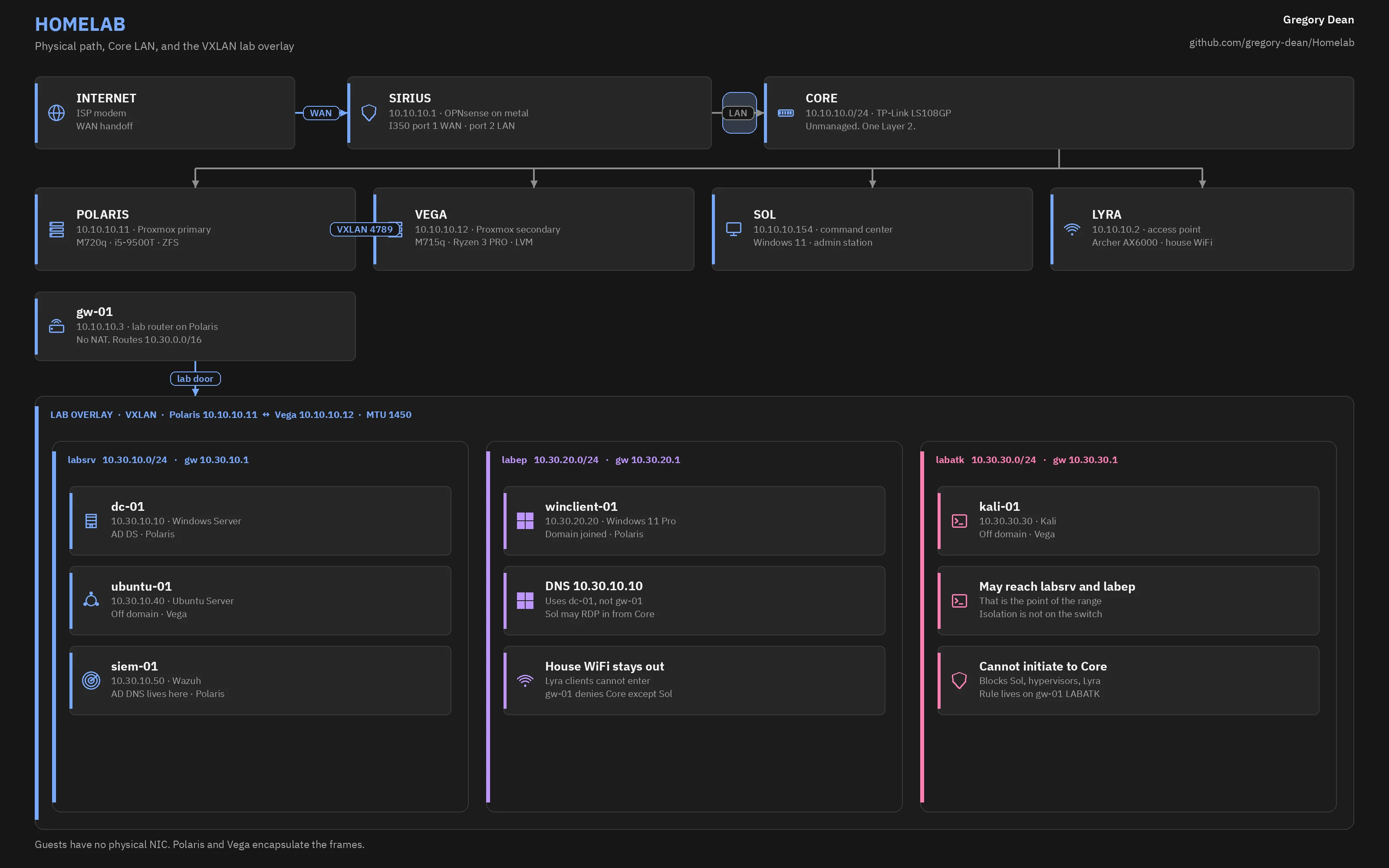
House WiFi clients on Lyra stay on Core and never enter the lab. Sol is the only machine I administer from. SSH and the Proxmox UI only accept Sol and the peer hypervisor.
DNS
I run two DNS zones on purpose, and they do different jobs.
home.lan is Core. Unbound on Sirius owns it, with DNSSEC and DNS over TLS upstream to 1.1.1.1 and 9.9.9.9. Dnsmasq handles DHCP and registers lease names.
lab.lan is Active Directory on dc-01. Sirius forwards that zone to 192.0.2.10, so Sol can resolve lab names without joining the domain.
What I use it for
I use this for cybersecurity projects first, and for personal stuff like self-hosting or game servers when the lab is quiet.
Wazuh is on siem-01, and Sysmon goes on the Windows guests. I generate telemetry, then practice the loop from exploit to detection.
Docs and guides
The docs describe the lab as it exists right now: what I bought, how it's addressed, and why the network is shaped the way it is.
The guides are how I'd build this again, written so you can follow along on your own hardware. The names and part numbers in the docs are what I actually run. The guides use placeholders so they aren't tied to my desk.